
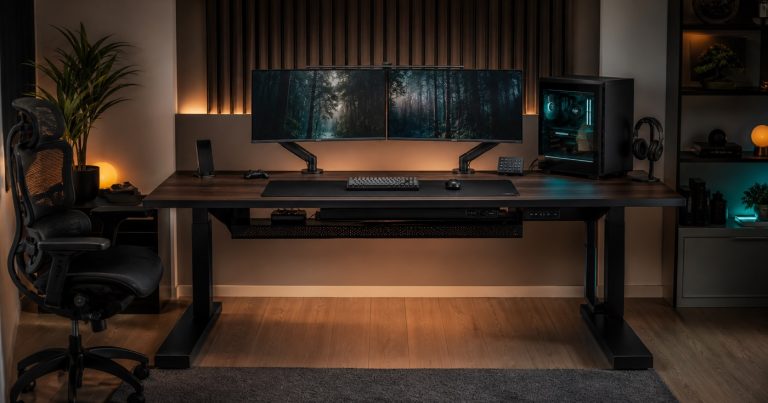
Gaming desks have moved beyond a shaped desktop with a cup holder. A serious PC setup may include multiple monitors, monitor arms, a desktop computer, speakers, a microphone arm, lighting, chargers, storage, controllers, a network connection, and a dense collection of power and data cables. When a desk is designed to organize those interfaces rather than merely hold them, it becomes a managed furniture system.
That creates a distinct category for buyers, retailers, distributors, and product teams. Smart gaming desks are not simply lower-priced office desks in a darker finish, and they are not the same proposition as height-adjustable desks. The core design task is to make high-value equipment feel stable, accessible, cool enough, tidy, and repairable while the desk still looks and ships like a credible piece of home furniture.
Begin With The Complete Setup, Not The Bare Desktop
A buyer brief should identify the real equipment configuration before selecting a desktop size or accessory list. A single-monitor console setup, a dual-monitor PC setup, a creator station with a camera and microphone, and a racing or simulation setup all create different requirements for usable depth, monitor-arm reach, edge clearance, cable exits, and accessible storage.
The desktop itself needs a defined load case. That includes static equipment, monitor-arm clamp loads, forces applied while a user adjusts an arm or leans on the desk edge, and the effect of a heavy PC tower placed at one side. A wide top can look stable while its subframe, fastener pattern, leg position, or material thickness is not appropriate for the intended configuration. The responsible specification defines the maximum supported arrangement and the relevant mounting zones rather than relying on an undifferentiated headline weight figure.
This is the main distinction from our coverage of smart height-adjustable desks. A gaming desk may offer an adjustable-height version, but its central sourcing challenge is equipment integration: monitor supports, desktop management, cable pathways, power interfaces, and component access at a fixed or changing workstation.
Monitor Support Is A Furniture Interface
Monitor arms give an uncluttered visual result, but they concentrate load at a clamp point, grommet opening, or mounting plate. That point must be designed into the desk. Buyers should require the approved monitor-arm mounting zone, the compatible desktop thickness, any reinforcement plate, edge-distance requirement, maximum arm and screen envelope, and the service procedure if an arm is removed or changed.
This is not a cosmetic detail. A clamp can damage a finish, compress a hollow top, or create a visible deflection if the desk construction was designed only for flat equipment loads. A better product makes the interface explicit: a marked but visually restrained mounting region, a replaceable grommet cover, an internal plate where required, and a clear rule for which third-party arms fit the finished desk.
The same principle applies to speakers, microphone arms, camera mounts, and CPU holders. Each accessory needs a location, a load assumption, fastening instructions, and enough surrounding clearance for hands and cables. A range that sells several accessories should be validated as a system, not as separate catalogue items.
Power And Cable Management Need A Controlled Boundary
Visible cables are an obvious objection in a premium setup, yet concealing cables irresponsibly creates a service and heat problem. The desk should define its cable path from the user-facing equipment through grommets or rear access, into a tray or channel, and toward the room power source. The system needs enough capacity for real cable bundles, no sharp metal edges, usable access during setup, and a path that does not trap cables against moving or removable furniture parts.
Power integration needs a tighter boundary. A product team should specify whether the desk includes only a passive cable tray, a separately supplied power strip, an integrated power module, USB charging, data pass-throughs, or a connected controller. Each choice changes the responsible supplier, electrical documentation, country plug configuration, replacement part plan, and the way a retailer describes the product.
Our earlier article on charging furniture and USB-C strategy is relevant here. A port count alone does not make a desk useful. The system must define its power budget, connector type, location, access, cable strain relief, service access, and destination-market configuration.
Treat Heat As An Equipment-Placement Issue
The desk is not responsible for cooling a computer, but its layout can help or hinder the equipment owner’s own cooling system. A fully enclosed CPU compartment, tightly packed rear cable zone, or fabric modesty panel placed too close to ventilation openings can restrict access and contribute to an avoidable support issue. Conversely, decorative fan modules should not be marketed as a substitute for the computer maker’s thermal design.
For a CPU shelf, under-desk mount, or integrated equipment bay, the specification should define the supported chassis dimensions, clearances, cable access, mounting method, cleaning access, and relationship to the computer’s own intake and exhaust locations. The correct arrangement depends on the actual equipment; the desk documentation should give boundaries rather than promise a universal thermal result.
Noise deserves the same discipline. Fan-equipped accessories, LED controllers, cable trays, loose fasteners, or hollow metal panels can create audible vibration in a quiet room. Sample review should include the actual desktop, subframe, accessories, cable load, and intended equipment mounting positions. A quiet empty prototype is not enough.
Smart Functions Should Stay Useful When Offline
Some desks add scene lighting, a touch controller, occupancy sensing, app control, USB hubs, or configurable charging and cable modules. These may improve the experience, but each feature must have a clear customer value and an offline behavior. Basic lighting or local controls should not become inaccessible because an app is unavailable or an account cannot be reached.
Connected functions also create a compliance and support boundary. In the European Union, the Radio Equipment Directive sets the framework for placing radio equipment on the market, including essential requirements for safety and health, electromagnetic compatibility, and efficient use of radio spectrum. The European Commission’s RED overview is a useful starting point for a connected desk, but a destination-market review still needs the exact radio module, software state, finished configuration, labeling, documentation, and conformity route.
For US-bound connected or digital versions, product teams should also obtain an appropriate review of the relevant finished device and its radio or digital modules. FCC Part 15 sets conditions and marketing requirements for radio-frequency devices, including equipment authorization where applicable. These sources are not a substitute for the responsible business’s product-specific compliance work.
Design For Changeable Equipment And Replaceable Parts
Gaming and creator equipment changes quickly. A desk designed around one monitor size, one power brick shape, or one proprietary light strip becomes difficult to support as customer setups evolve. Buyers should prefer modularity that is deliberate rather than decorative: replaceable cable covers, separately packaged accessory rails, standard mounting zones, accessible fasteners, interchangeable power modules where appropriate, and a clean way to add or remove an accessory without drilling into a finished surface.
The parts plan should distinguish a consumer-replaceable desk mat, grommet, cable clip, accessory rail, or LED diffuser from a technician-only electrical module. It should identify part numbers, compatible desk revisions, service instructions, warranty responsibility, and the procedure when a component supplier changes a controller, connector, or cable harness.
This is consistent with the broader approach in smart furniture integration: furniture, electrical components, controls, and final assembly need shared change control. Without it, a small module substitution can create a late-stage fit, labeling, or service failure.
Quality Control Must Cover The Underside
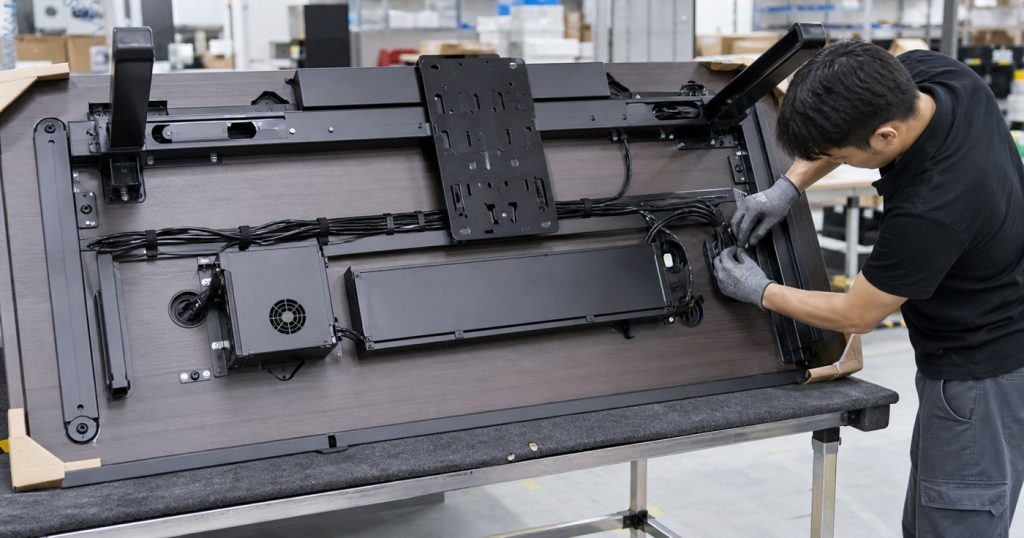
The visible desktop cannot be the only inspection surface. A finished-product check should review the subframe, fastener torque or locking method where specified, monitor-arm reinforcement, grommets, cable-tray fit, cable routing, connector strain relief, access-panel alignment, sharp-edge control, fan or lighting operation where included, and the behavior of any local controls.
The test should use representative accessories. Load an approved monitor-arm configuration, route a realistic cable set, fit the intended tray or power module, and confirm that a user can set up and maintain the desk without damaging the top or trapping cables. If the desk ships with electronic modules, the factory should retain appropriate component identity and configuration records so replacement and corrective action do not rely on visual guesswork.
Finishes also deserve a practical test plan. Desk mats, clamp accessories, headsets, beverage handling, keyboard movement, and cable clips repeatedly contact the desktop. The finish, edge treatment, and printed marks where used should be reviewed for the intended daily use rather than only inspected under showroom lighting.
Packaging Is About Protecting Interfaces, Not Only Panels
Gaming desks often have wide tops, metal frames, rails, trays, lighting components, and separate accessory cartons. A carton plan has to protect the finish while preventing hidden component damage. Cable trays can bend, grommet covers can crack, thin metal plates can distort, and a monitor-arm reinforcement kit can be lost even when the outer carton appears intact.
Our analysis of furniture packaging and transit damage applies directly. Receiving checks should verify the top, frame, mounting hardware, trays, cable components, electronic modules where included, and installation document set. The assembly sequence should make it clear which parts must be installed before heavy equipment is placed on the desk.
Retail displays should demonstrate a realistic but manageable setup. A fully loaded display can help customers understand cable management and monitor positioning, but it needs a store-safe power plan and a clear separation between the desk’s included features and the third-party equipment used for demonstration.
What Buyers Should Approve Before Launch
A launch-ready brief should identify the target setup, desktop dimensions, intended monitor-arm zones, supported accessories, load cases, subframe, cable route, power and data boundary, equipment placement clearances, local and connected controls, component access, replacement parts, country configuration, packaging, and assembly instructions.
It should also define the claims that can be made. “Cable-managed,” “monitor-arm ready,” “power-integrated,” “connected,” and “thermal-aware” each need a precise product meaning. The strongest range is one whose retail language can be traced directly to an approved component schedule and finished-product test.
2026 Takeaway
Smart gaming desks are becoming a furniture systems category because the equipment around them is more complex, more valuable, and more central to home entertainment and creator work. The opportunity is not to add a few lights to a desk. It is to make an intensive PC setup feel organized, stable, adaptable, and supportable.
For buyers and brands, the strongest suppliers will be the ones that coordinate desktop structure, monitor support, cable paths, power boundaries, equipment clearance, modular accessories, quality control, packaging, and service as one finished furniture product.